Measure the floor.
Not the tape.
Gammetry turns phone photos of a floor into a true-size drawing in feet and inches. Clean up the shape with precise CAD tools, lay the pieces out on sheets, and send cut files straight to your CNC or laser.
- Scan and draw free
- $5 per job, or $25 a year
- No auto-renew
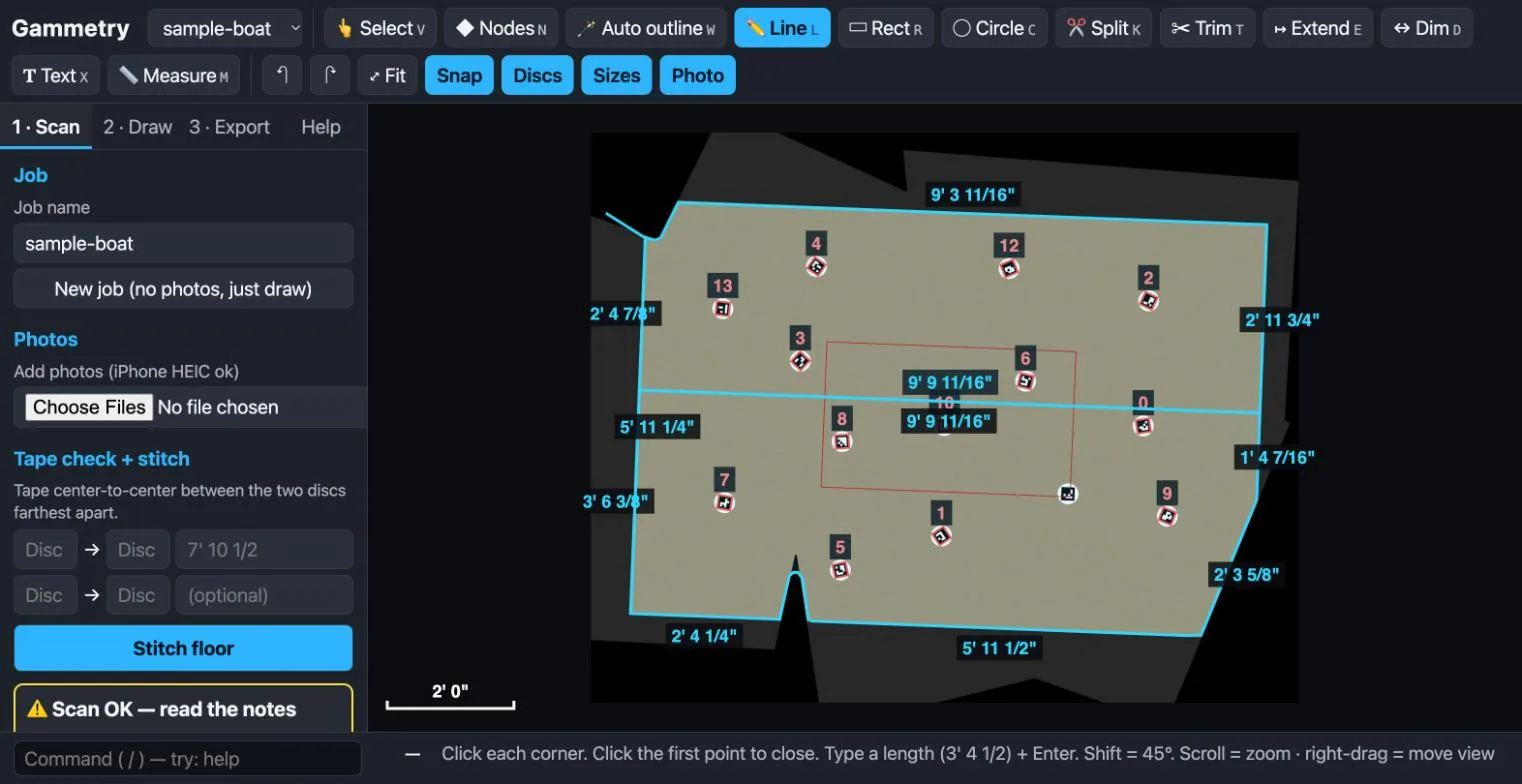
How it works
Three steps from a bare floor to cut parts.
Lay down the discs
Scatter the coded target discs across the floor. Each one has its own number, so Gammetry knows exactly where every photo was taken from.
Take overlapping photos
Walk the floor and shoot straight down with your phone. Tape one distance between two discs as a check, then press Stitch.
Draw, nest, cut
Trace the outline, split it into pieces that fit your sheets, and export a DXF per sheet for the CNC, or an SVG for the laser.
Precise 2D drawing
Built like real CAD. Simple enough for the shop floor.
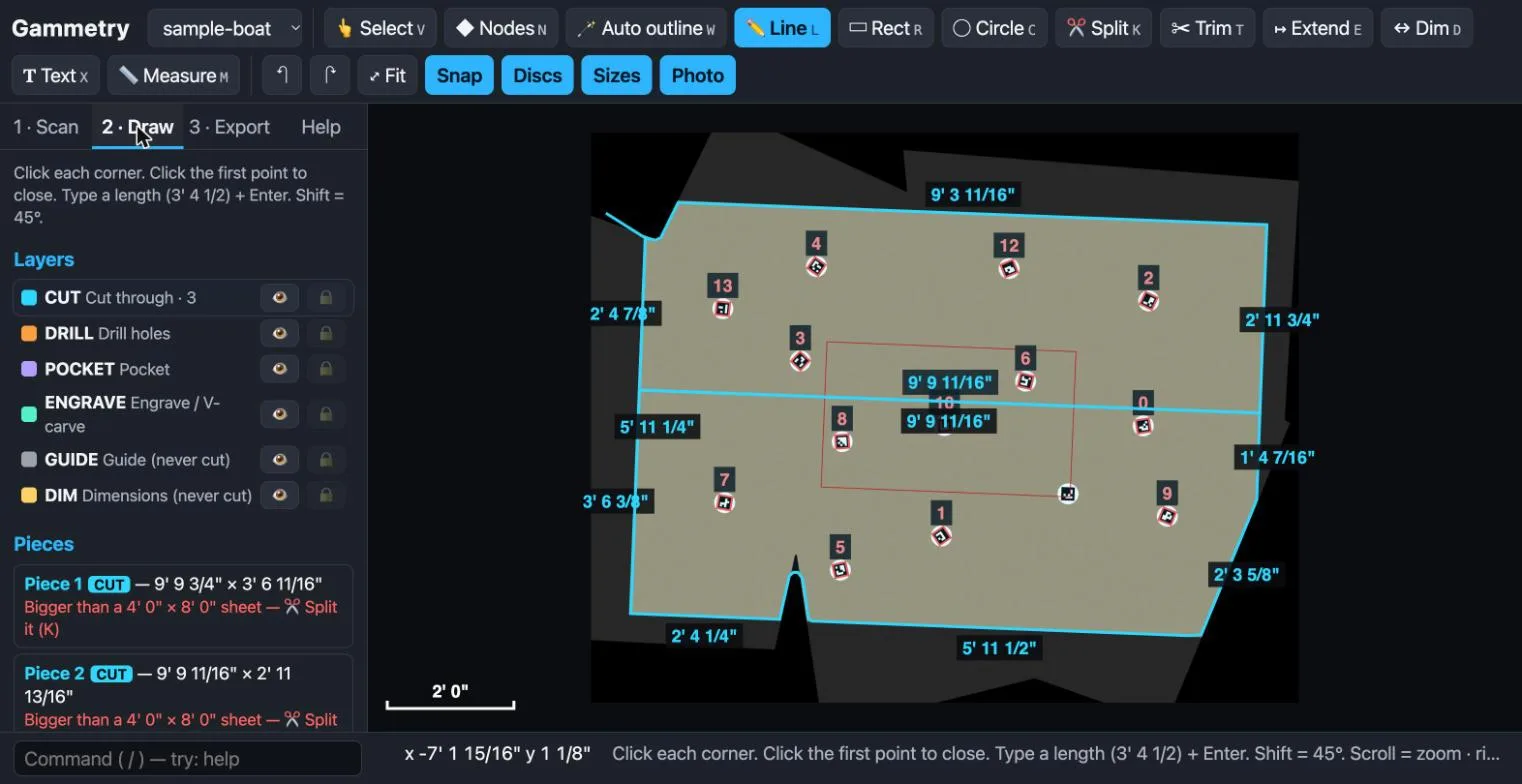
Type a length like 3' 4 1/2 and press Enter. Snap to ends, midpoints, centers and intersections. Use the command line when your hands already know what to do.
- Object snapsEnd, mid, center, intersection, perpendicular and nearest, with a tag that shows what you hit.
- Trim, extend, join, weldFix the shape without redrawing it. Fillet or chamfer any corner.
- Layers that mean somethingCut, drill, pocket, engrave, guide and dimension layers come out the other side intact.
- Text and dimensionsLabel every piece and dimension the drawing in feet and inches.
Everything in the box
From photo to finished part, without leaving the app.
True-size scanning
Coded discs and your phone camera stitch into one flat, measured photo of the whole floor.
Auto outline
Tap the floor and Gammetry traces its edge for you. Tidy it with nodes and curves.
Split to fit
Pieces too big for a sheet turn red. Split them by hand, or let Gammetry split them to fit.
Sheet nesting
Pack every piece onto 4×8 sheets (or any size) with your gap and margin, and turn pieces 90° when the grain allows.
Clean exports
DXF in inches with real arcs and named layers, one file per sheet, SVG for laser cutters, Laguna .mmg, and full-size paper templates you can tape together.
Command line
Move, copy, rotate, mirror, scale, offset and array by typing, with full undo and history.
Made for
Anyone who templates a floor by hand today.
Pricing
Pay for the jobs you cut. Nothing else.
Scanning and drawing are free. You only pay when a job exports its cut files, and you can re-export that job as often as you like.
Free
$0
Try everything before you pay.
- Scan and stitch floors
- Draw, edit and dimension
- Lay out pieces on sheets
- Print a one-page plan
- Free disc files to make your own
Job pass
$5per job
For the one boat or one room.
- Export one job's cut files
- DXF, SVG, Laguna .mmg and full-size paper templates
- Re-export that job any time
- Buy several at once if you like
Year
$25per year
Pays for itself by job six.
- Unlimited jobs for 12 months
- Every export, every update
- Works offline on your Mac
- No auto-renew. We remind you.
Gammetry is in early access. Checkout opens soon; join the list and we'll email you first.
Questions
Good to know
What counts as one job?
One job is one floor or project folder: its photos, its drawing and its cut files. A job pass is used the first time that job exports a cut file: DXF, SVG, Laguna .mmg or full-size paper templates. The one-page printed plan is always free. After that you can change the drawing and export it again as often as you like.
What do I need?
A Mac, a phone with a camera, a tape measure and a set of target discs. The installer sets up everything else the first time, which takes a few minutes and needs the internet once. After that Gammetry works offline.
Where do the discs come from?
The disc files come free with Gammetry: laser-cut and UV-print files, plus a paper version you can print at home. If you'd rather not make them, a ready-made set of 20 discs is sold at rlf3d.com.
How accurate is it?
Accuracy depends on the photos and on taping one check distance between two discs, which Gammetry asks for every time. We're testing on real boats now and will publish real-world numbers here when that testing is done. Until then, always check a few key distances with a tape before you cut.
Which machines does it work with?
Gammetry exports standard DXF files in inches, with named layers and true arcs, plus SVG files in millimetres. Most CNC router software and laser software can open them.
Is it a subscription?
No. The year plan is one payment for 12 months and does not renew by itself. We'll remind you before it ends, and you decide.
Do my floors get uploaded?
No. Photos and drawings stay on your Mac. Gammetry only checks your license with our site when you activate it, and when a job pass is used.
Windows?
Mac only for now. Tell us through the contact form if you need Windows, so we know how many people are asking.